In-app agent operations
Use the MCP Stack dashboard operator and the public support widget, including the server tools and frontend tools each surface can use.
MCP Stack includes two first-party in-app agent surfaces. Both use AgentSDK over the AG-UI agent transport. The dashboard operator runs inside the signed-in dashboard sidebar and uses your current organization permissions. The public support widget runs on marketing and help pages and answers from public docs only.
The dashboard operator is embedded in the dashboard navigation instead of a floating chat bubble. It can read the current route, inspect resources, render operational tables, and ask for approval before writes.
The operator panel intentionally shows the protocol boundary: AgentSDK streams the sidebar over AG-UI, browser frontend tools handle page context and rendering, and server MCP tools run through Gateway/AuthGateway with the signed-in user's permissions.
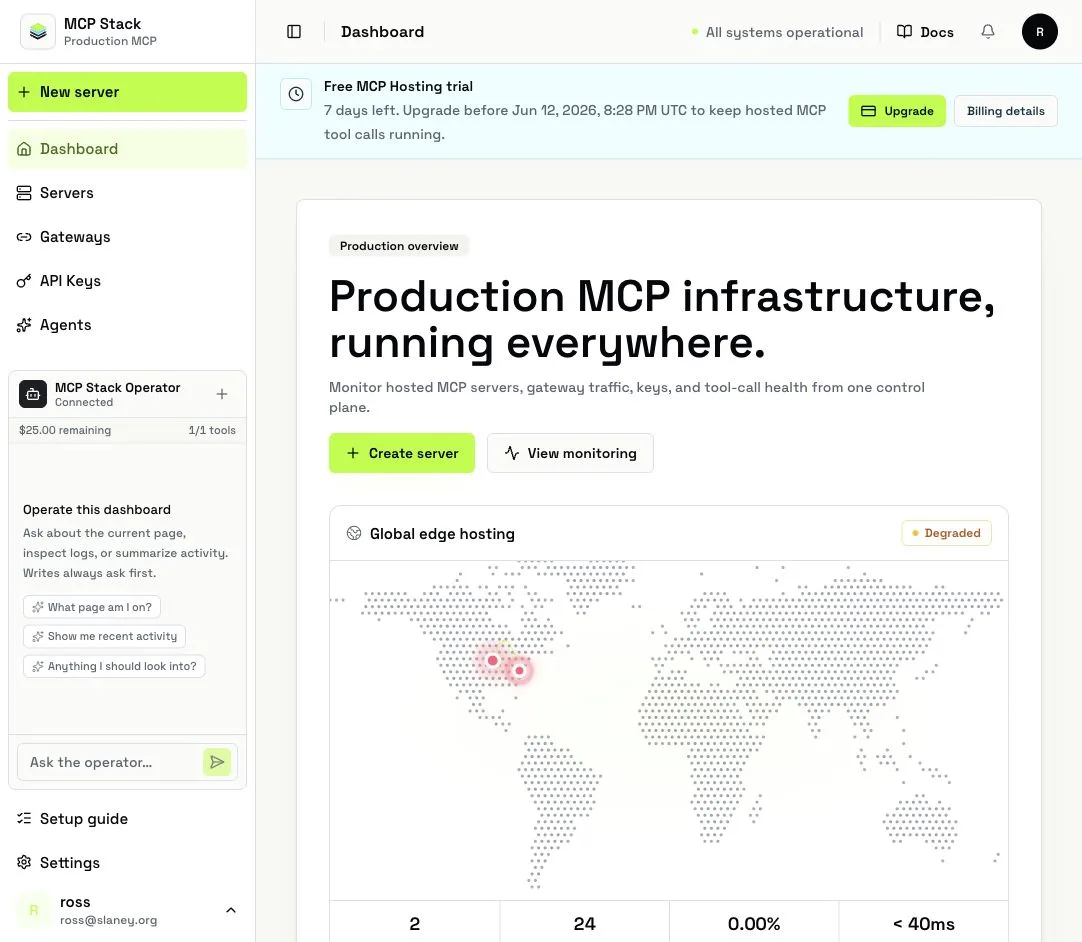
The operator stays in the dashboard sidebar, connected to the seeded MCP Stack Operations server.
These are the supported ask patterns for the embedded dashboard operator. They are not separate browser scripts: the agent combines current route context, server MCP tools, approval requests, and render operations to complete the request.
| Screen | Example commands | What the agent should do |
|---|---|---|
| Dashboard home | "Summarize dashboard health", "What should I check next?", "Show MCP server issues" | Read organization stats, analytics, permission hints, and visible route context; render a compact insight or chart; navigate to the relevant dashboard route when asked. |
| Server list | "List my MCP servers", "Which servers are unhealthy?", "Open the operations server", "Create a test server from this OpenAPI URL" | List or filter servers, summarize status, navigate to server detail routes, and request approval before creating a server. |
| New server flow | "Create a generated server from this public OpenAPI spec", "Which creation path should I use?", "Take me to generated server setup" | Explain the creation path from dashboard context, navigate to the right setup route, or create the server through the MCP server tool after approval. |
| Server overview | "Summarize this server", "Run diagnostics", "Show deployment status", "Does this server have a Gateway attached?" | Use the current server id, fetch server/deployment/gateway attachment data, run hosting checks or tools-list smoke checks, and render an operational insight. |
| Server connect tab | "Show me the hosted MCP URL", "Explain how this server is authenticated", "Take me to the Gateway for this server" | Read current server and Gateway attachment details, explain connection state, and navigate to related server or Gateway routes. |
| Server tools tab | "Which tools are enabled?", "Disable this tool", "Enable all safe read tools", "Refresh tools from OpenAPI" | List tools, update one or many tools only after approval, refresh OpenAPI when requested, and refresh the dashboard after mutations. |
| Server activity tab | "Show the last 1000 requests for this server", "Any errors in the last hour?", "Chart latency", "Show deployment logs" | Use the current server id and visible filters, page through request logs or deployment operations, render a paginated table, and render charts or insights for errors and latency. |
| Server config tab | "Update the server description", "Refresh the OpenAPI spec", "Attach this Gateway", "Detach the Gateway" | Fetch current config, ask for approval before metadata/spec/tool/Gateway changes, call the server tool, and refresh the page after success. |
| Agents list | "List agents", "Create an agent for support triage", "Which agents have high usage?" | List agents, fetch usage where relevant, render summaries or charts, and request approval before creating an agent. |
| Agent detail | "Summarize this agent", "What MCP servers is it connected to?", "Show recent conversations", "How much budget is left?" | Use the current agent id, inspect configuration, usage, attached MCP servers, and conversations; render tables for conversation lists and charts for usage. |
| Agent config and embed pages | "Update this agent prompt", "Explain the embed setup", "Show app auth requirements" | Request approval before agent updates, explain embed-key and SDK setup from current context, and avoid creating secrets or bypassing auth. |
| Gateways list | "List Gateways", "Create a Gateway", "Which Gateway should I use for this server?" | List Gateways, inspect linked servers, request approval before creating a Gateway, and navigate to Gateway detail pages. |
| Gateway detail | "Show linked servers", "Show Gateway logs", "Attach this Gateway to my current server", "Show recent grants" | Use the current Gateway id, list linked servers, grants, and logs, render paginated log tables, and request approval before attach or detach operations. |
| Usage and monitoring | "Chart usage this week", "Find expensive users", "What changed today?", "Show deployment errors" | Use the selected time range when available, fetch dashboard analytics, agent usage, logs, or deployment operations, then render charts or insights. |
| Billing settings | "Summarize plan limits", "What is close to quota?", "Show recent credit activity" | Explain limits, usage, and credit state from the dashboard and backend reads. Billing mutations are not available in v1. |
| Settings and account pages | "What organization am I in?", "Do I have permission to manage servers?", "Take me to billing" | Read organization context and permission hints, answer from visible context and permissions checks, and navigate. Member changes are not available in v1. |
| API keys page | "Explain which key I need", "Take me to Gateway setup" | Explain key concepts and navigate. API key creation, reveal, rotation, and deletion are not available in v1. |
| Deployments page | "Summarize deployment activity", "Show recent deployment errors", "Open the server with the latest failed deploy" | Use hosting and deployment read tools when a server is known, summarize visible deployment context, and navigate to server activity or config routes. |
| Domains page | "Explain custom domains", "Which server needs a domain?", "Take me to the server connect tab" | Explain the page from route context and navigate to supported server or Gateway setup screens. Domain mutations are not available in v1. |
| MCP directory pages | "Explain this directory entry", "Can I create a server from this?", "Take me to generated server setup" | Answer from visible route context, explain the import path, and navigate to server creation. Directory publishing mutations are not available in v1. |
| Auth, SSO, and OAuth pages | "Explain this auth setup", "What should I configure next?", "Take me to Gateway setup" | Explain concepts and navigate to supported setup routes. SSO/admin auth mutations are deliberately omitted in v1. |
| Widget builder page | "How does this connect to agents?", "Take me to the agent embed page", "What app auth pieces do I need?" | Explain embed architecture, route to agent embed/config pages, and avoid creating secrets. |
| Conversations page | "Summarize recent conversations", "Which conversations need review?", "Open the related agent" | Use agent conversation tools when an agent is known, summarize visible conversation context, and navigate to agent pages. |
For customer SaaS applications, this is the same pattern to copy: server tools own durable data, while frontend tools provide route context, guarded approvals, navigation, refresh, and rich rendering.
This is the complete v1 command surface for signed-in dashboard pages. Routes marked context-only can still use frontend tools for page awareness, navigation, and explanation, but they do not expose a dedicated server mutation in the operator.
| Dashboard route or screen | Page context | Read commands | Write commands | UI commands |
|---|---|---|---|---|
/ dashboard home | dashboard | Current org, dashboard stats, dashboard analytics, permissions checks, server issue summaries. | None directly from this screen. | Render insights/charts, refresh, navigate to servers, agents, gateways, usage, monitoring, billing, or settings. |
/mcp-servers server list | mcp_servers | List servers, inspect status, summarize unhealthy servers, open a server. | Create an MCP server after approval. | Navigate to server detail, new server, activity, tools, connect, or config routes. |
/mcp-servers/new, /new/generate, /new/connect | mcp_server_new | Explain generated versus connected server setup and validate whether an OpenAPI source is appropriate. | Create a generated MCP server after approval. | Navigate between creation paths and refresh after creation. |
/mcp-servers/:serverId overview | mcp_server + overview | Get server metadata, deployment state, Gateway attachment, analytics, hosting checks, tools-list smoke test. | Update server metadata after approval. | Render health insights, navigate to related Gateway, tools, activity, connect, or config tabs. |
/mcp-servers/:serverId/connect | mcp_server + connect | Read hosted URL, Gateway attachment, deployment state, auth shape, and connect guidance. | Attach or detach a Gateway after approval. | Navigate to Gateway detail or refresh connection state. |
/mcp-servers/:serverId/tools | mcp_server + tools | List enabled/disabled tools and summarize OpenAPI-derived tool coverage. | Update one tool, bulk update tools, or refresh OpenAPI after approval. | Render tool summaries and refresh the tab after mutation. |
/mcp-servers/:serverId/activity | mcp_server + activity | List request logs, filter errors/successes, page logs, fetch analytics, fetch deployment operations and deployment logs. | None directly from activity. | Render paginated log tables, charts, and operational insights; load more pages from approved page specs. |
/mcp-servers/:serverId/config | mcp_server + config | Read server config, OpenAPI state, deployment state, and Gateway attachment. | Update metadata/spec, refresh OpenAPI, attach Gateway, detach Gateway, update tools after approval. | Refresh the page and navigate to related detail pages. |
/agents agent list | agents | List agents, summarize status and usage, open an agent. | Create an agent after approval. | Navigate to overview, config, embed, usage, conversations, or playground routes. |
/agents/:agentId overview, usage, embed, config, conversations, playground, agent | agent | Get agent details, usage, conversations, attached MCP servers, embed setup, budget state. | Update agent configuration after approval. | Render usage charts/conversation tables, navigate between agent tabs, refresh after mutation. |
/gateways gateway list | gateways | List Gateways and summarize linked server posture. | Create a Gateway after approval. | Navigate to Gateway detail or server detail pages. |
/gateways/:gatewayId gateway detail | gateway | Get Gateway details, linked servers, grants, logs, and recent traffic. | Attach or detach the Gateway to an MCP server after approval when a target server is known. | Render Gateway log tables and navigate to linked servers. |
/usage and /monitoring | usage or monitoring | Dashboard analytics, server analytics, agent usage, request logs, deployment operations. | None in v1. | Render charts, insights, and paginated operational tables using the selected time range. |
/settings, /settings/account, /settings/members | settings | Current org, account context, permission checks, and navigation guidance. | None in v1; member changes are deliberately omitted. | Navigate to billing or supported resource pages. |
/settings/billing | billing | Plan limits, usage, credits, quota state, and dashboard activity relevant to billing. | None in v1; billing mutations are deliberately omitted. | Render quota summaries and navigate to usage/monitoring. |
/api-keys | api_keys | Explain key concepts and when Gateway or app auth is preferred. | None in v1; API key creation, reveal, rotation, and deletion are deliberately omitted. | Navigate to Gateway setup, server connect tabs, or docs. |
/deployments | deployments | Deployment summaries, deployment operations, deployment logs, and hosting health when a server is named or visible. | None in v1; runtime scale and rollback are deliberately omitted. | Render deployment insights and navigate to server activity/config routes. |
/domains | domains | Custom domain setup guidance and related server or Gateway context when named. | None in v1; domain mutations are deliberately omitted. | Navigate to server connect routes, Gateways, or docs. |
/multi-mcp | multi_mcp | Explain multi-server composition and route to the servers or Gateways involved. | None in v1. | Navigate to server, Gateway, or docs routes. |
/mcp-directory, /mcp-directory/:slug | mcp_directory | Explain directory entries, import paths, and generated-server setup. | None in v1; directory publishing mutations are deliberately omitted. | Navigate to generated server setup or server detail routes. |
/auth-config | auth_config | Explain auth configuration, app-owned auth, Gateway auth, and supported server auth posture. | None in v1. | Navigate to Gateways, server connect tabs, or docs. |
/sso | sso | Explain SSO posture and permission requirements from visible context. | None in v1; member and SSO admin mutations are deliberately omitted. | Navigate to settings or docs. |
/widget-builder | widget_builder | Explain widget/embed setup and related agent or support-widget configuration. | None in v1. | Navigate to agent embed/config pages or docs. |
/conversations | conversations | Summarize conversation context, then use agent conversation tools only when an agent is named or selected. | None in v1. | Navigate to agent detail, conversations, or usage pages. |
/oauth-connect | oauth_connect | Explain OAuth connection state and Gateway/app-auth setup from visible context. | None in v1. | Navigate to Gateways, server connect tabs, or docs. |
Client operations run in the browser. They do not replace backend authorization; they give the agent current page context and safe UI affordances.
| Operation | Use |
|---|---|
getDashboardContext | Return the current route, organization id, page kind, resource ids, active tab, visible filters, selected time range, and permission hints. |
refreshDashboardView | Revalidate the current dashboard route after a successful backend mutation. |
navigateDashboard | Open dashboard routes for servers, agents, gateways, usage, monitoring, billing, settings, or home. |
renderPaginatedResourceList | Render host-side tables for logs, deployment operations, conversations, and similar result sets. If rows are missing, the dashboard uses route context to fetch a safe first page for server logs, agent conversations, or Gateway logs. |
renderOperationsInsight | Render a compact operational summary, diagnosis, or recommendation. |
renderOperationsChart | Render a compact chart for usage, error, latency, or deployment analysis. |
requestApproval approval requests | Show the pending write plan in the sidebar before create, update, attach, detach, or bulk tool changes. |
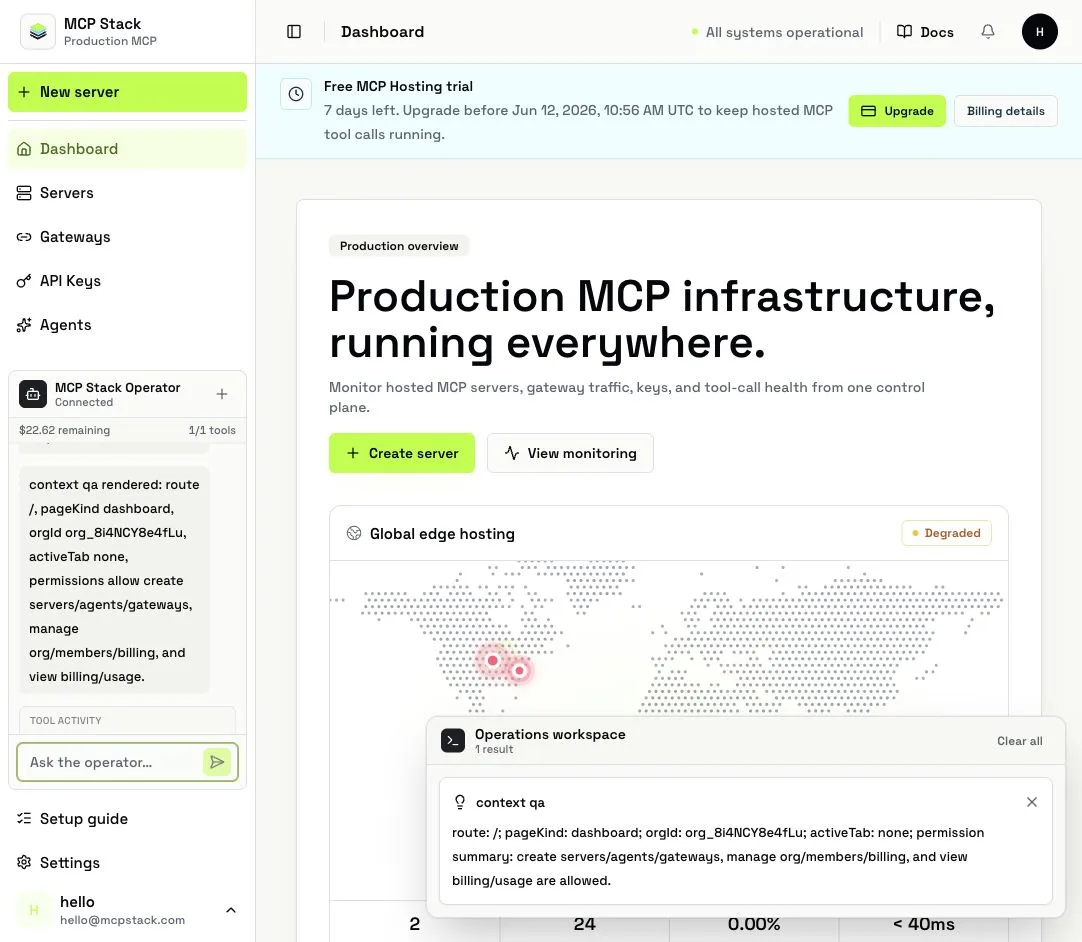
Route context and permission hints let the operator understand which dashboard page you mean.
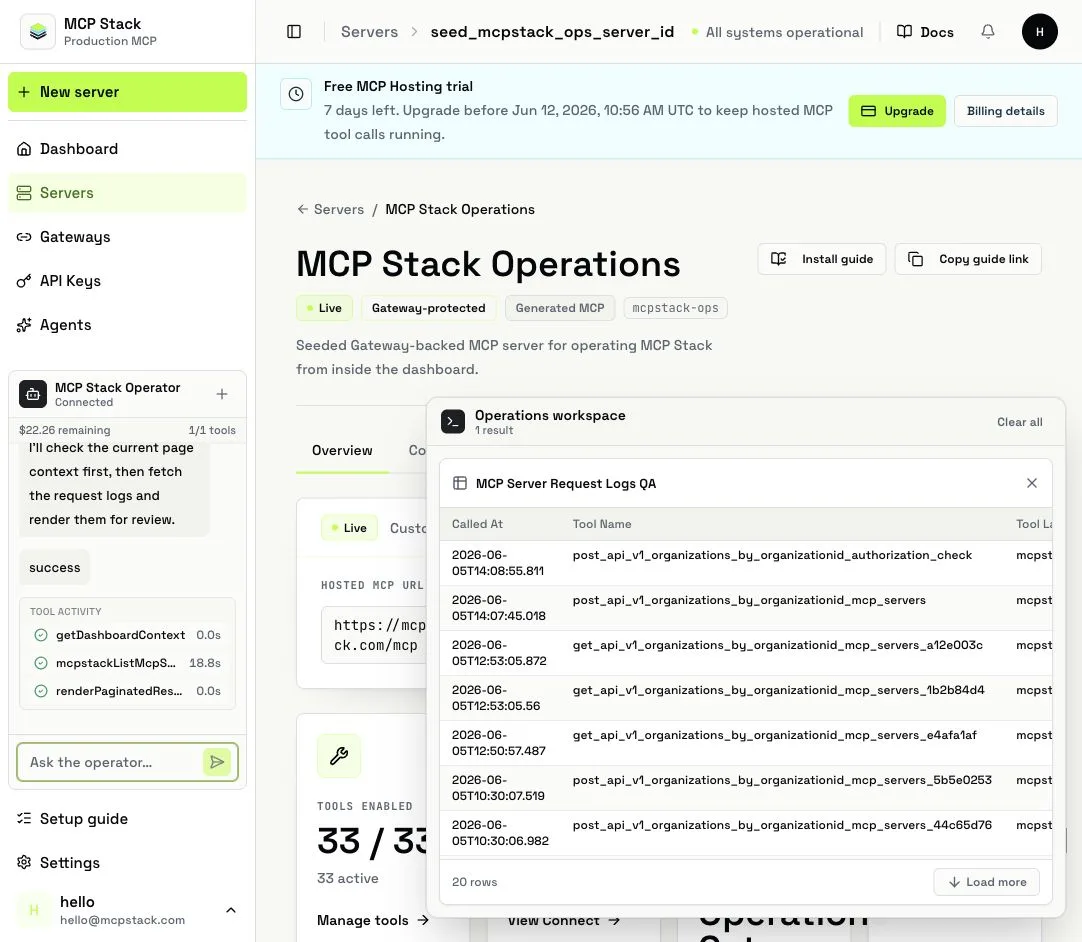
The operator can render paginated operational tables backed by approved page specs.
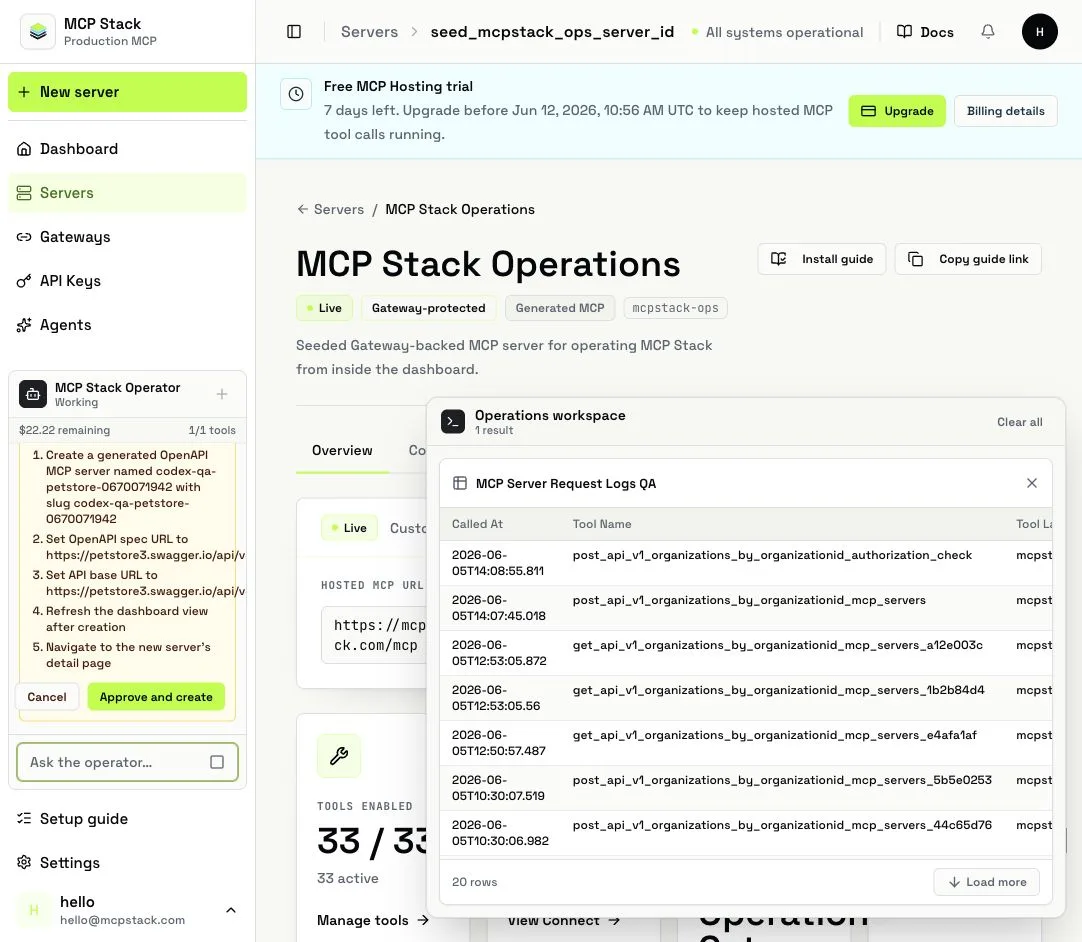
Write operations ask for approval in the sidebar before the server tool runs.
Server operations call the seeded MCP Stack Operations MCP server. They use the same REST controllers and FGA checks as the dashboard and CLI.
| Area | Operations |
|---|---|
| Organization and dashboard | mcpstackListOrganizations, mcpstackGetDashboardStats, mcpstackGetDashboardAnalytics, mcpstackCheckOrganizationPermissions |
| MCP servers | mcpstackListMcpServers, mcpstackGetMcpServer, mcpstackCreateMcpServer, mcpstackUpdateMcpServer, mcpstackRefreshMcpServerOpenApi, mcpstackUpdateMcpServerTool, mcpstackBulkUpdateMcpServerTools, mcpstackListMcpServerRequestLogs, mcpstackGetMcpServerAnalytics |
| Hosting and runtime | mcpstackGetMcpServerDeployment, mcpstackGetMcpServerDeploymentLogs, mcpstackListMcpServerDeploymentOperations, mcpstackRunMcpServerHostingChecks, mcpstackSmokeTestMcpServerToolsList |
| Agents | mcpstackListAgents, mcpstackGetAgent, mcpstackCreateAgent, mcpstackUpdateAgent, mcpstackGetAgentUsage, mcpstackListAgentConversations |
| Gateways | mcpstackListGateways, mcpstackGetGateway, mcpstackCreateGateway, mcpstackListGatewayLinkedServers, mcpstackListGatewayGrants, mcpstackListGatewayLogs, mcpstackGetMcpServerGatewayAttachment, mcpstackAttachGatewayToMcpServer, mcpstackDetachGatewayFromMcpServer |
The v1 operator deliberately omits destructive deletes, member changes, billing mutations, API key creation, and runtime scale or rollback controls. Permission failures should be surfaced plainly as lack of permission. Quota failures should be treated as billing or plan limits, not FGA failures.
The public support widget is available before sign-in. It uses a public docs MCP server with no account-specific tools or writes.
| Operation | Use |
|---|---|
getSupportPageContext | Return the current public route, locale, page kind, visible heading, and page title. |
searchMcpStackDocs | Search the public MCP Stack docs index. |
getMcpStackDoc | Fetch one public docs article so the answer can cite it directly. |
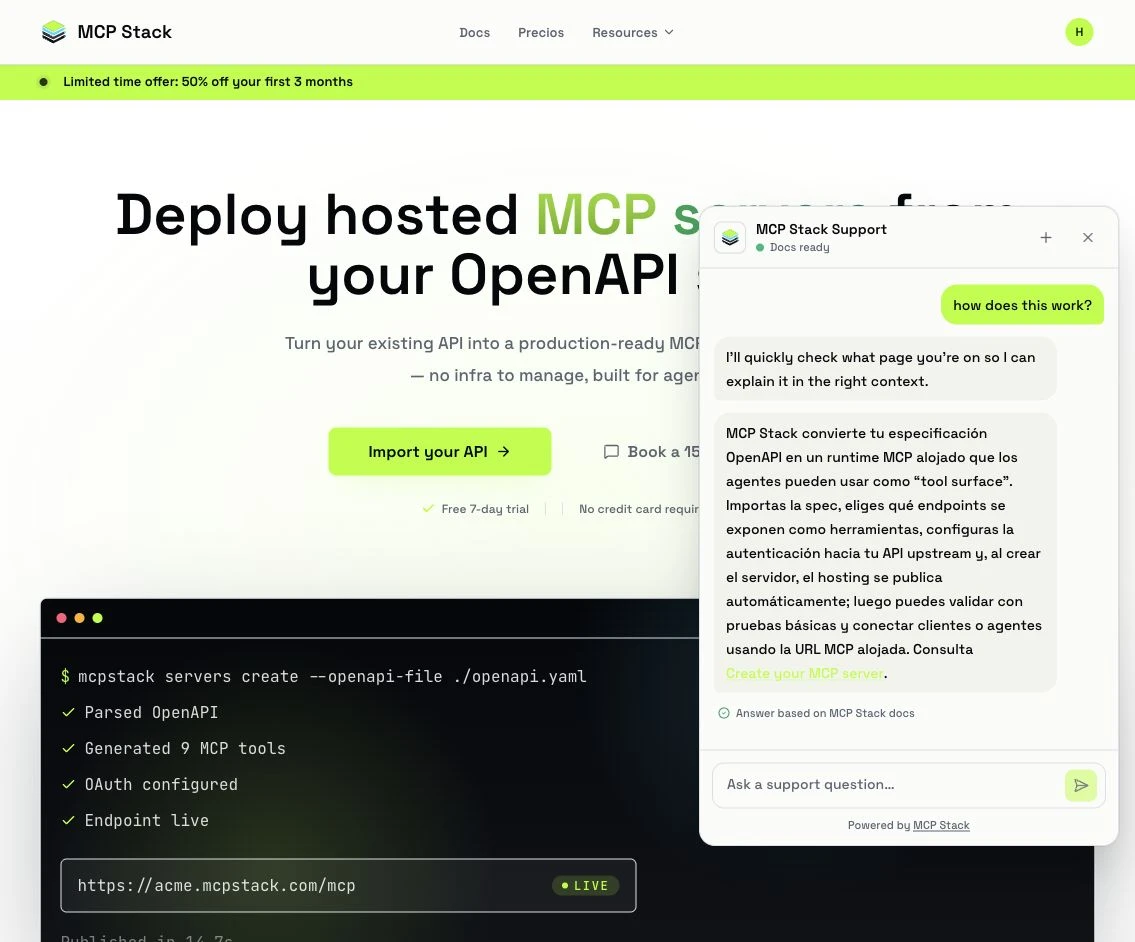
The public widget answers from docs and links the article it used.
The server MCP tools are the source of truth for data. Frontend tools are AG-UI frontend tools used only for context, navigation, refresh, approval, and rendering. Backend reads and writes still run through the signed-in user or configured public support identity, and every resource operation remains permission-gated by MCP Stack FGA.