Select tools and write instructions
Turn a parsed OpenAPI spec into an MCP tool surface that agents can use safely and accurately.
The Select Tools step is where you decide what the agent can call. Do not treat it as a checklist where every endpoint should stay enabled. MCP tools should be specific, useful, and safe enough for a model to choose.
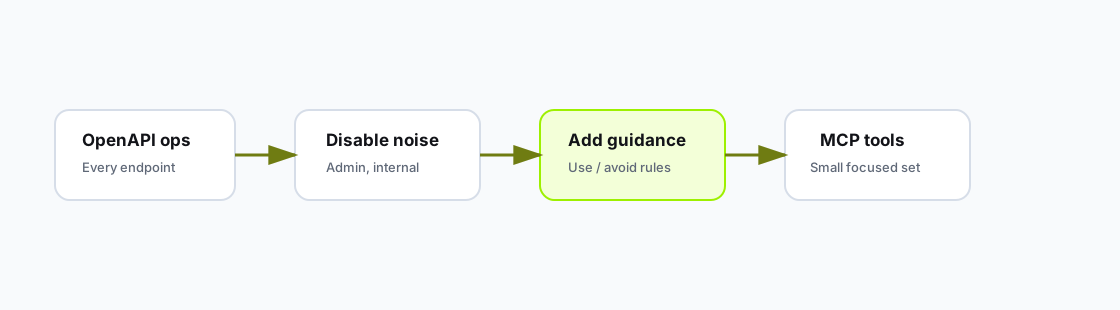
Tool selection is the quality gate between a raw API contract and an agent-facing MCP server.
Keep tools that are:
Good first tools:
Disable tools that are:
A small set of well-described tools is usually more useful than exposing every endpoint. You can add more tools after testing real prompts.
The endpoint editor supports three kinds of guidance.
| Field | Use it for | Example |
|---|---|---|
| Custom instructions for AI | How the tool should be used in context | "Ask for confirmation before posting a public reply." |
| When to use | Positive selection guidance | "Use when the user asks for ticket history or recent notes." |
| When NOT to use | Negative selection guidance | "Do not use for billing disputes. Use the billing tools instead." |
Use this template for important write tools:
Purpose:
Use this tool to [specific business action].

Before calling:
- Confirm [record identity].
- Confirm [side effect].
- Ask for missing required fields.

Do not use when:
- The user is only asking for information.
- The user has not confirmed the change.
- The target record belongs to another workspace.

After calling:
- Summarize the result.
- Mention any follow-up action the user may need.Weak instruction:
Updates a ticket.Better instruction:
Use this tool only after the user confirms the exact ticket and the new status.
Do not use it for public customer replies or internal notes. If the user asks to
close a ticket, first summarize the ticket ID, current customer, and target status.
After the call, report the new status and any API warning returned by the tool.After tool selection, test the server with prompts that force the model to choose between similar tools.
| Prompt type | Example | What it proves |
|---|---|---|
| Read-only | "Find the latest ticket for Acme." | Search and lookup tools are clear. |
| Guarded write | "Close ticket T-102 as resolved." | Confirmation guidance is respected. |
| Wrong domain | "Refund this invoice." | Ticket tools do not get selected for billing work. |
| Missing input | "Update the customer." | The agent asks follow-up questions. |
Start with the smallest useful action set. Enable read tools first, guarded write tools second, and broad admin actions last, only after policy and scopes are clear.