OAuth and Gateway fundamentals
Understand what MCP Stack Gateway does for OAuth-backed MCP servers and external clients.
MCP Stack Gateway is the OAuth edge for servers that need user-scoped access. You attach it to a hosted server: Host serves the MCP URL, and Gateway adds the identity layer in front of it. Gateway publishes OAuth discovery metadata, brokers downstream OAuth for external clients, validates app-owned tokens for embedded clients, and forwards authorized requests to the runtime.
Gateway sits between MCP clients and the runtime so identity, metadata, grants, and request logging are centralized.
Production MCP clients need more than a raw HTTP endpoint. They need to know:
Gateway turns those requirements into a reusable profile attached to one or more MCP servers.
Useful official references:
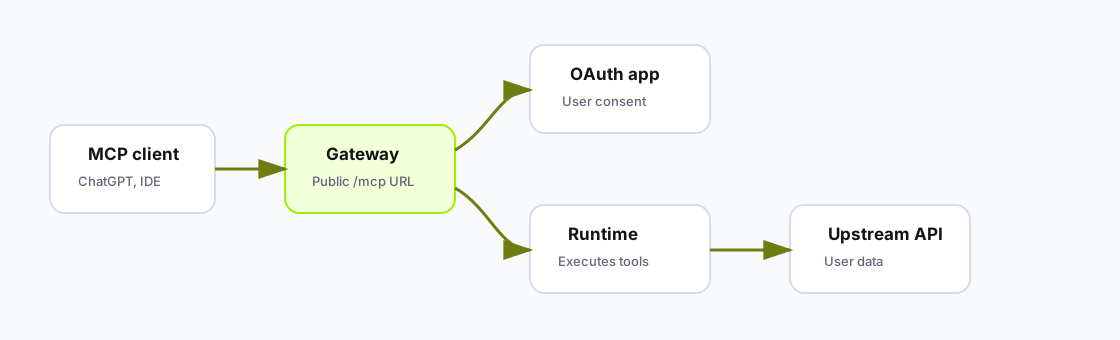
Gateway is the OAuth edge for external MCP clients. The generated runtime focuses on tool execution.
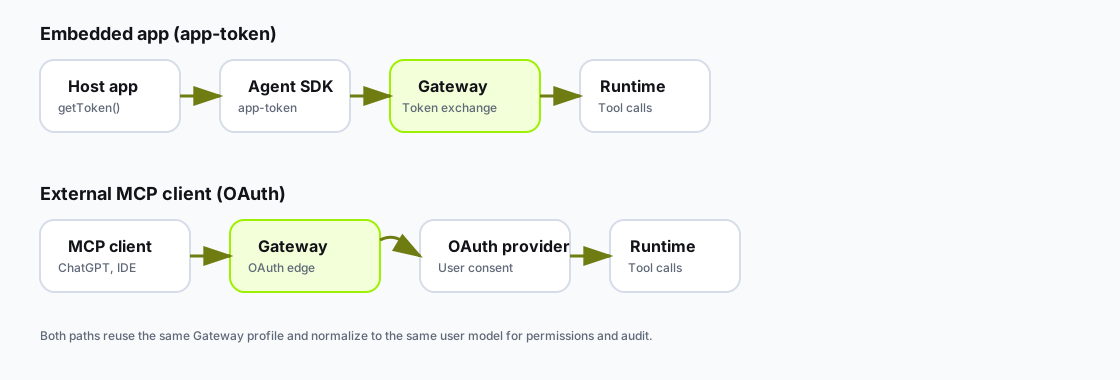
Embedded apps exchange an existing app token; external MCP clients use standards-based OAuth against the same Gateway profile.
For an embedded app, the user is already signed in to the host product. The SDK should use the host app's token getter:
useAppAgent({
  apiKey: "mcpstack_pk_xxxx",
  agentId: "ag_support",
  appSessionKey: session.id,
  userIdentity: {
    subject: session.user.id,
    email: session.user.email,
    organizationId: session.organizationId,
  },
  auth: {
    mode: "app-token",
    getToken: () => session.getAccessToken(),
  },
});
Gateway validates the app token against the existing Gateway profile and exchanges it for an MCP-facing token. External clients still use OAuth discovery and authorization against the same Gateway URL.
The embedded exchange is not OAuth client registration. In app-token mode, the SDK sends the app token directly to Gateway's embedded exchange endpoint. Gateway uses the attached Gateway profile plus the agent's allowed origins and server linkage to decide whether the exchange is allowed. OAuth registration and authorization remain for external MCP clients.
See Embed an agent with app auth for the full dashboard, SDK, and troubleshooting path.
Embedded app auth and external OAuth are different entry paths, but Gateway should normalize them into the same user model.
For example, if the same ChecklistSquad user uses the embedded app and also connects the ChecklistSquad MCP server from ChatGPT, both paths should map to the same app user and workspace after Gateway validates the tokens.
Use the stable app user and workspace identity for that match. Treat session ids as session metadata, not as the main user id.
A Gateway profile usually includes:
| Field | Meaning |
|---|---|
| Provider | Manual, Auth0, Entra, SqlOS, or another configured provider type. |
| Authorization server URL | Issuer or base authorization server URL. |
| Metadata URL | Optional exact authorization server metadata URL. |
| Client ID | OAuth client registered with the downstream provider. |
| Resource or audience | API audience expected by the authorization server. |
| Scopes | Downstream scopes required by enabled tools. |
| Callback URL | MCP Stack Gateway callback registered in the downstream provider. |
For embedded app-token auth, Gateway reuses that same profile:
| Check | Source |
|---|---|
| Token issuer and JWKS | Authorization server URL or metadata URL from the Gateway profile. |
| Token audience | Resource or audience from the Gateway profile. |
| Requested scopes | Scopes exposed by the Gateway-backed MCP server. |
| Browser origin | Allowed origins on the agent. |
| Server access | The agent must be linked to the MCP server. |
Do not use Gateway to hide a single shared user token. Gateway is for user grants and OAuth state. If every call should use the same upstream credential, choose Static Headers instead.
In one sentence:
Gateway is the OAuth edge in front of a hosted MCP server. Embedded apps exchange their existing user token; external MCP clients use standards-based OAuth. Both receive MCP-facing tokens for the same server.
Before you configure it, know which authorization server you use, what resource/audience you expect, and what scopes your selected tools require.