Configure a Gateway profile
Create or attach a Gateway profile for OAuth-backed MCP servers from the dashboard, CLI, or REST API.
A Gateway profile stores the OAuth and resource settings that MCP Stack uses when a server needs user-scoped auth. Create it from the Gateway page, inline during server generation, or through automation.
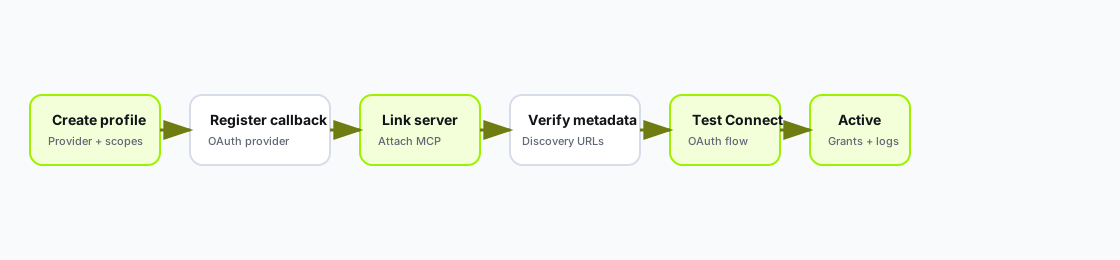
Every path ends with a working Connect flow and Gateway logs that show authorization and tool calls.
Before you start:
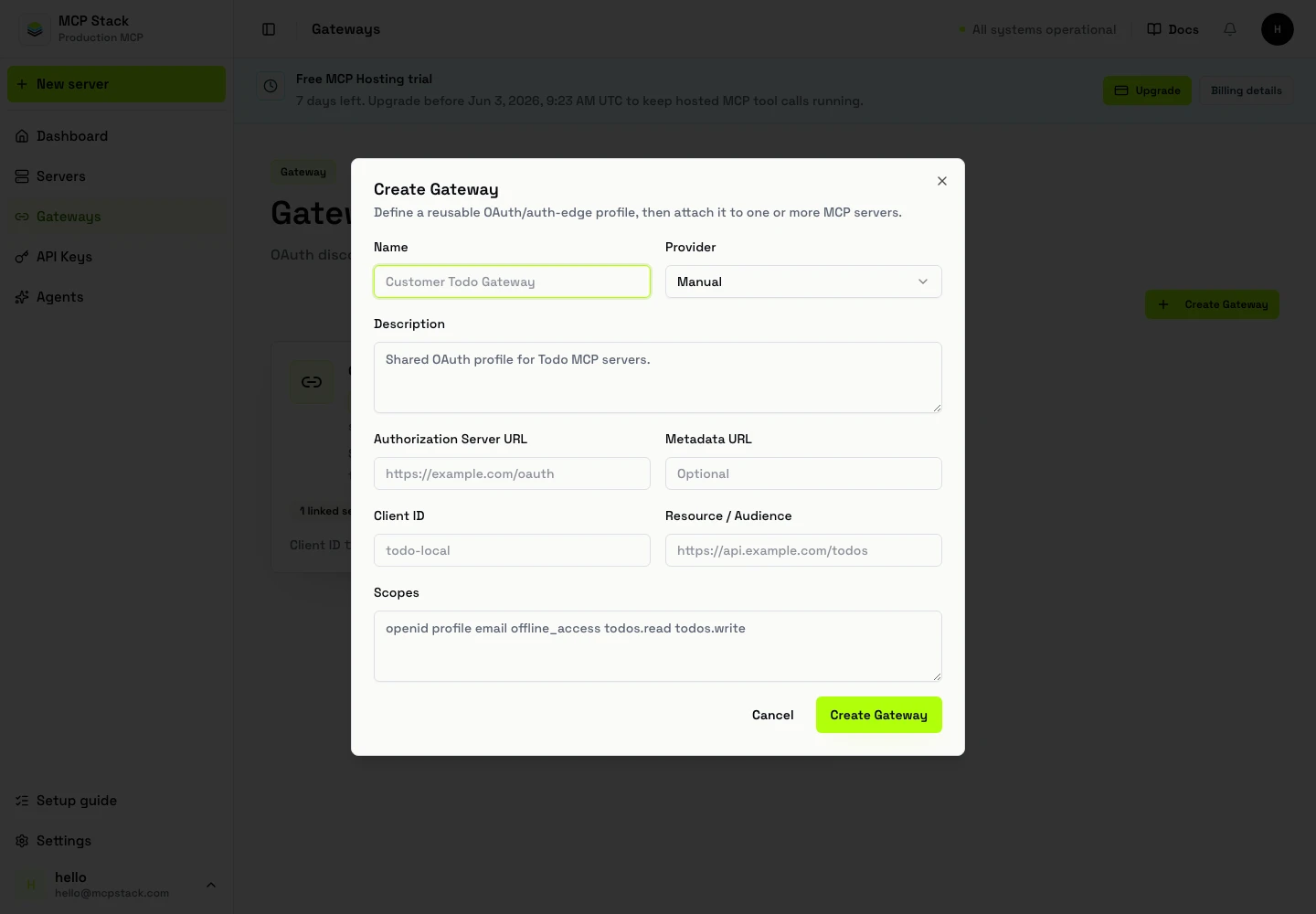
Gateway profiles live in their own workspace so OAuth settings can be reused across generated servers, agents, and external MCP clients.
Gateways.Create Gateway.Connect tab and run a test authorization.You can also create a Gateway inline from the OpenAPI wizard Authentication step when generating a new server.
mcpstack gateways create \
  --name support-gateway \
  --provider manual \
  --authorization-server-url https://auth.example.com \
  --client-id your-client-id \
  --resource https://api.example.com \
  --scopes "openid profile email" \
  --json

mcpstack servers gateway attach support-api --gateway gw_support --json
mcpstack gateways get gw_support --json
mcpstack gateways logs gw_support
Inspect linked servers and recent auth events when debugging scope or audience mismatches.
Create a Gateway profile:
POST /api/v1/organizations/{orgId}/gateways
Authorization: Bearer {token}
Content-Type: application/json

{
  "name": "Support Gateway",
  "providerType": "manual",
  "authorizationServerUrl": "https://auth.example.com",
  "clientId": "your-client-id",
  "resource": "https://api.example.com",
  "scopes": ["openid", "profile", "email"]
}
Attach the profile to a server:
PUT /api/v1/organizations/{orgId}/mcp-servers/{serverId}/gateway
Authorization: Bearer {token}
Content-Type: application/json

{
  "gatewayId": "gw_support"
}
Read Gateway logs:
GET /api/v1/organizations/{orgId}/gateways/{gatewayId}/logs?page=1&pageSize=50Register the Gateway callback URL in the downstream OAuth provider. The Connect or Gateway page shows the exact value for the server/profile.
Typical provider checklist:
Application type: Web application
Allowed callback URL: copy from MCP Stack Gateway
Allowed logout URL: optional, provider-specific
Allowed origin: your MCP Stack origin if required
Scopes: least privilege for the enabled tools
Audience/resource: upstream API audience| Field | Use when |
|---|---|
| Authorization server URL | The provider has standard well-known metadata. |
| Metadata URL | You need to point to an exact discovery document. |
| Authorization endpoint | Discovery is missing or non-standard. |
| Token endpoint | Discovery is missing or non-standard. |
| Registration endpoint | The client supports dynamic registration and provider exposes it. |
Start with openid, profile, email, and read scopes required by your first tools. Add write scopes only when the corresponding write tool is enabled and the downstream API enforces user-level authorization.
The same Gateway profile serves external MCP clients and embedded app-token exchange. See OAuth and Gateway fundamentals and Embed an agent with app auth.
| Symptom | What to check |
|---|---|
| OAuth callback fails | Callback URL registered exactly in the provider; no trailing slash mismatch. |
| Invalid audience | Gateway resource/audience matches upstream API expectation. |
| Missing scopes | Enabled tools require scopes not granted during authorization. |
| Metadata 404 | Authorization server URL or metadata URL is wrong or unreachable. |
| Embedded exchange fails | Agent allowed origins, Gateway profile issuer/audience, server linkage. |
Have the provider, issuer, client ID, resource/audience, scopes, and registered callback URL ready before you start. Most Gateway setup problems are a mismatch in one of those fields.