Set up a custom MCP domain
Attach a customer-owned domain to a hosted MCP server from the dashboard, CLI, or REST API.
Hosted MCP servers get a canonical MCP Stack URL automatically. Add a custom domain when your public endpoint should use your own hostname, such as mcp.example.com or agents.example.com.
Custom domains are available for hosted generated OpenAPI servers. MCP Stack manages Azure Front Door TLS for the custom hostname, keeps the canonical platform URL as a fallback, and only prefers the custom MCP URL after DNS and routing are active.
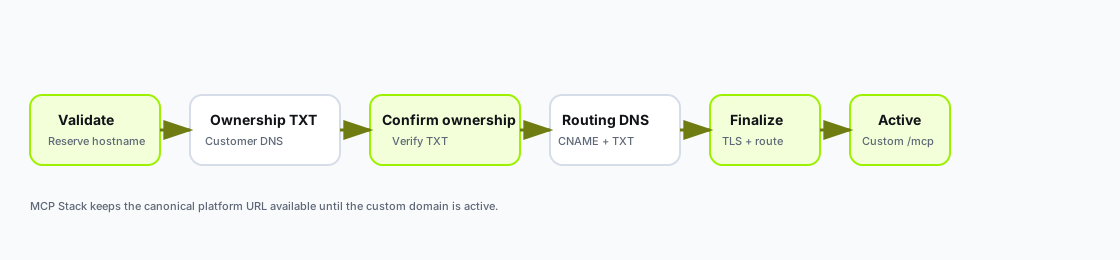
Every dashboard, CLI, and API path follows the same staged workflow: validate the hostname, prove ownership, confirm ownership, add routing DNS, finalize, then use the active custom URL.
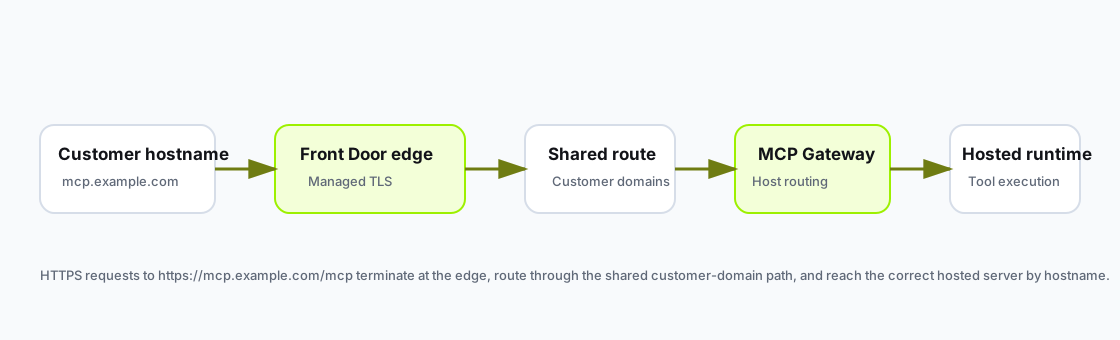
Customer traffic reaches your hosted MCP runtime through managed TLS at the edge, a shared customer-domain route, and regional edge-router host-header routing.
Before you start, make sure you have:
mcp.example.comMCP Stack v0 supports one custom hostname per hosted server. Use a subdomain only. Apex domains, wildcard domains, IP addresses, localhost names, and MCP Stack platform-owned hostnames are not accepted.
Use the dashboard when you want a guided flow:
MCP Servers.Hosting tab.Custom Domain, enter a hostname such as mcp.example.com.Validate domain.Confirm ownership.Finalize custom domain after DNS propagates.Connect and copy the MCP URL after the domain is active.The dashboard shows the canonical fallback URL, current custom-domain status, required DNS records, and the preferred MCP URL. Pending domains are not shown as the preferred connection URL until TLS and routing are active.
Use the CLI for repeatable setup and CI-driven environments.
Create a hosted generated OpenAPI server:
mcpstack servers create \
  --name support-api \
  --slug support-api \
  --runtime-type hosted \
  --openapi-url https://api.example.com/openapi.json \
  --json
Validate the custom domain and print the ownership TXT record:
mcpstack servers custom-domain validate srv_123 \
  --hostname mcp.example.com \
  --environment prod \
  --json
Create the returned ownership TXT record at your DNS provider. The record proves that you control the hostname before MCP Stack prepares any routing.
Confirm ownership, then inspect the status until routing records are available:
mcpstack servers custom-domain confirm-ownership srv_123 --environment prod --json
mcpstack servers custom-domain get srv_123 --environment prod --json
Create the returned CNAME and Azure TXT records at your DNS provider, then finalize the custom domain after DNS resolves:
mcpstack servers custom-domain finalize srv_123 --environment prod --jsonWhen the status is active, validate the runtime through the same environment:
mcpstack servers checks srv_123 --environment prod --json
mcpstack smoke tools-list srv_123 --environment prod --json
Remove the custom domain:
mcpstack servers custom-domain delete srv_123 --environment prod --yesUse the REST API when you are building domain setup into your own admin workflow.
Create the hosted server:
POST /api/v1/organizations/{orgId}/mcp-servers
Authorization: Bearer {token}
Content-Type: application/json

{
  "name": "Support API",
  "slug": "support-api",
  "runtimeType": "hosted",
  "openApiSpecUrl": "https://api.example.com/openapi.json"
}
Validate the custom domain and return the ownership TXT record:
POST /api/v1/organizations/{orgId}/mcp-servers/{serverId}/custom-domain/validate
Authorization: Bearer {token}
Content-Type: application/json

{
  "hostName": "mcp.example.com",
  "environment": "prod"
}
The response includes status, URLs, and the ownership DNS record:
{
  "hostName": "mcp.example.com",
  "status": "pending_ownership",
  "mcpUrl": "https://support-api.mcpstack.com/mcp",
  "canonicalMcpUrl": "https://support-api.mcpstack.com/mcp",
  "dnsRecords": [
    {
      "type": "TXT",
      "name": "_mcpstack-verify.mcp.example.com",
      "value": "mcpstack-1234abcd..."
    }
  ]
}
After creating the ownership TXT record, confirm ownership:
POST /api/v1/organizations/{orgId}/mcp-servers/{serverId}/custom-domain/confirm-ownership?environment=prodAfter ownership is confirmed, the API returns routing records when they are ready:
{
  "hostName": "mcp.example.com",
  "status": "pending_dns",
  "dnsRecords": [
    {
      "type": "CNAME",
      "name": "mcp.example.com",
      "value": "example.azurefd.net"
    },
    {
      "type": "TXT",
      "name": "_dnsauth.mcp.example.com",
      "value": "front-door-validation-token"
    }
  ]
}
After creating the routing DNS records, finalize the custom domain:
POST /api/v1/organizations/{orgId}/mcp-servers/{serverId}/custom-domain/finalize?environment=prodUse the lifecycle endpoints to inspect or remove the domain:
GET /api/v1/organizations/{orgId}/mcp-servers/{serverId}/custom-domain?environment=prod
DELETE /api/v1/organizations/{orgId}/mcp-servers/{serverId}/custom-domain?environment=prod
confirm-ownership checks the MCP Stack ownership TXT record and prepares Azure Front Door records. finalize checks routing DNS, waits for managed TLS when necessary, and associates the domain with the hosted regional edge-router route when ready.
Create exactly the DNS records returned by MCP Stack at each step:
| Record | Purpose |
|---|---|
TXT _mcpstack-verify.<host> | Proves hostname ownership before routing setup starts. |
| CNAME | Sends mcp.example.com traffic to the MCP Stack Front Door endpoint. |
TXT _dnsauth.<host> | Proves hostname ownership to Azure Front Door for the managed TLS certificate. |
DNS propagation can take several minutes. If ownership is still pending, wait for your DNS provider TTL and run confirm-ownership again. If routing is still pending, wait for propagation and run finalize again. Managed TLS can take several minutes after Azure confirms the TXT record.
Custom domains move through these statuses:
| Status | Meaning |
|---|---|
pending_ownership | MCP Stack is waiting for the ownership TXT record. |
preparing_domain | Ownership is confirmed and MCP Stack is preparing Azure Front Door records. |
pending_dns | Add the returned CNAME and _dnsauth TXT records, then finalize. |
tls_provisioning | Azure has accepted the domain and is provisioning managed TLS. |
routing | TLS is ready and MCP Stack is attaching the hostname to the shared edge route. |
active | The custom /mcp URL is live and preferred. |
failed | MCP Stack could not complete the current step; fix the error and retry the relevant step. |
The custom MCP URL is:
https://mcp.example.com/mcpThe canonical MCP Stack URL remains available as a fallback. Use the Connect tab, CLI custom-domain get, or API response as the source of truth for which URL is active.
| Symptom | What to check |
|---|---|
Domain stays pending_ownership | Confirm the _mcpstack-verify TXT name and value match the API response exactly. |
Domain stays pending_dns after ownership confirmation | Confirm the CNAME and _dnsauth TXT names and values match the API response exactly. |
Domain stays tls_provisioning | Wait for Azure Front Door managed certificate provisioning, then run finalize again. |
| Setup says a previous removal is still finishing | Wait for the prior Front Door cleanup to complete, then run confirm-ownership or finalize again. This can happen if you remove and re-add the same hostname immediately. |
tools/list fails on the custom URL | Run hosted checks and confirm the server runtime is healthy before debugging DNS. |
| API rejects the hostname | Confirm it is a subdomain you own, not an apex, wildcard, IP address, localhost, or MCP Stack platform hostname. |
Create the hosted server first, validate the custom domain, add the ownership TXT record, confirm ownership, add the returned CNAME and Azure TXT records, finalize after propagation, then use the custom /mcp URL only once the domain is active.