Troubleshoot common issues
Diagnose generation, OAuth, Host publishing, client connection, agent, and embed problems.
Most MCP Stack issues fall into one of six layers: OpenAPI generation, runtime auth, Gateway OAuth, Host publishing, external client connection, or agent/embed behavior. Debug in that order so you do not tune prompts while the runtime is unhealthy.
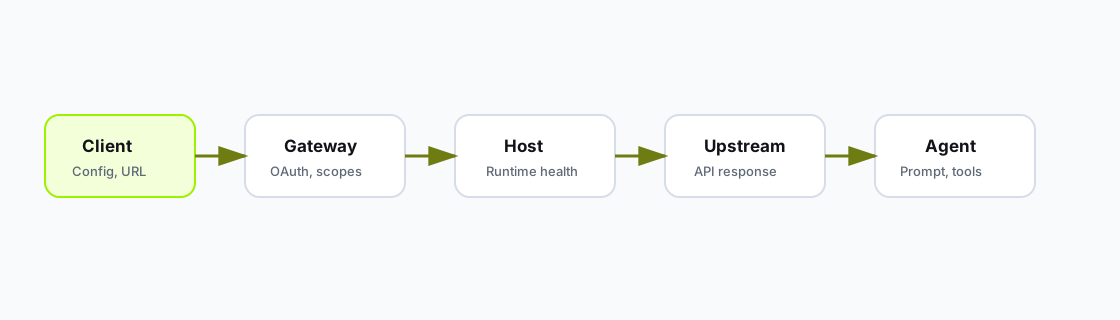
Troubleshoot from the lowest failing layer upward.
| Symptom | Check |
|---|---|
| Tools have odd names | Missing or duplicated operationId values. |
| Tool input schema is vague | Missing request body or parameter schemas. |
| Wrong API base URL | OpenAPI servers entry is incorrect. |
| Too many tools | Disable internal, duplicate, or risky endpoints. |
| OAuth not detected | securitySchemes missing or provider metadata is non-standard. |
| Symptom | Check |
|---|---|
| Upstream returns 401 | Wrong mode, missing static header, expired downstream grant, or missing scope. |
| Every user appears as same identity | Static Headers used where Gateway is required. |
| OAuth callback fails | Callback URL not registered exactly in provider. |
| Invalid audience | Gateway resource/audience does not match provider/API expectation. |
| Client cannot discover auth | Protected-resource metadata is unreachable or wrong. |
| Symptom | Check |
|---|---|
| Hosted URL does not respond | Publish not healthy or runtime target not routed. |
| First call is slow | Check route health and upstream API latency, then retry after health checks pass. |
tools/list fails | Runtime is unhealthy, wrong URL, or auth is blocking list. |
| Tool call times out | Upstream API is slow or tool does too much work in one call. |
| Logs are empty | Request may be hitting the wrong URL or client config. |
Run:
curl -i https://your-public-mcp.example.com/mcp
curl -i https://your-public-mcp.example.com/.well-known/oauth-protected-resource
mcpstack smoke tools-list support-api
Confirm:
/mcp.tools/list passes from MCP Stack.| Symptom | Check |
|---|---|
| Custom domain stuck in pending | DNS TXT/CNAME propagation; run mcpstack servers custom-domain get. |
| Connect tab shows old URL | Domain not finalized; canonical MCP Stack URL still works. |
| TLS or HTTPS errors on custom hostname | Finalize step incomplete or CNAME points to wrong target. |
See Set up a custom MCP domain.
| Symptom | Check |
|---|---|
| Hosted agent stops responding | Organization AI credit balance under Settings → Billing. |
| Tool calls blocked on hosted plan | Tool-call quota or max duration for your hosting tier. |
| Budget exhausted for one agent | Agent monthly budget on Usage page; see Embedded agent budgets. |
| Symptom | Check |
|---|---|
| Agent does not call a tool | Tool descriptions are vague or wrong server attached. |
| Agent calls unsafe write too quickly | Tool instructions and system prompt lack confirmation rules. |
| Embedded exchange fails or loops | Stale getToken, wrong issuer/audience, origin not in agent allowed origins, or changing appSessionKey. See Embed an agent with app auth. |
| Wrong user connected | Missing or incorrect userIdentity. |
| Local UI action fails | clientTools schema or execute handler is wrong. |
Include:
Organization:
Server ID:
Gateway ID:
Agent ID:
MCP URL:
Client:
Timestamp and timezone:
Tool name:
Expected result:
Actual error:
Relevant Gateway/runtime log line:Don't start with prompt wording. First locate the failing layer, then collect the exact URL, server/gateway/agent IDs, timestamp, and whether tools/list passes.