Embed an agent with app auth
Add an MCP Stack agent to your app without making signed-in users complete a second login.
Use @mcpstack/agent-sdk when you want an MCP Stack agent inside your own product. In an embedded app, the normal path is app-owned auth: your app keeps its existing session, the SDK asks your app for the current access token, and Gateway exchanges that app token for an MCP-facing token.
The user should not see a second sign-in window just to use AI inside a product where they are already signed in.
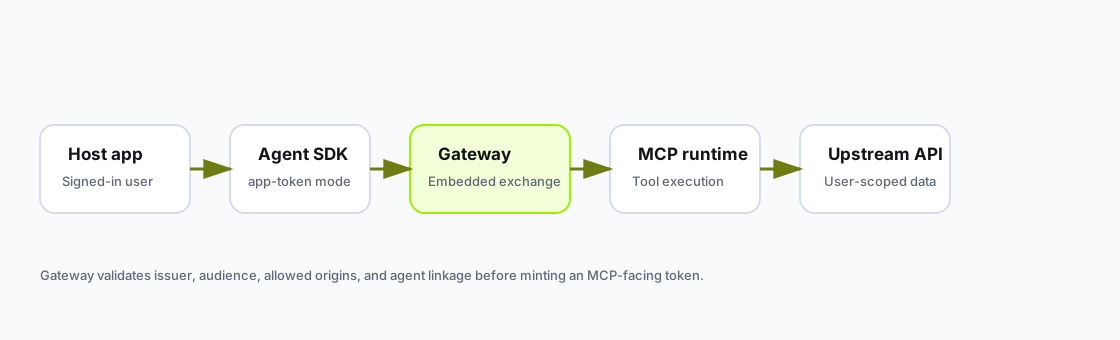
Your app owns the user session. Gateway validates the app token and mints an MCP-facing token for tool calls.
Before you embed:
tools/list passingmcpstack_pk_* agent public key with allowed browser origins configureduserIdentity and appSessionKey in your host appAgents and create or select an agent.Embed tab.Verified domains card and confirming ownership. Localhost origins are auto-verified for development.mcpstack_pk_* key. Public embed keys remain visible after creation.Configure agent budgets on the agent Budget & Usage tab if you need spend limits.
Install the SDK:
npm install @mcpstack/agent-sdkRender with app-token auth:
import { useAppAgent } from "@mcpstack/agent-sdk/react";

export function SupportAssistant({ session }: { session: AppSession }) {
  const agent = useAppAgent({
    apiKey: process.env.NEXT_PUBLIC_MCPSTACK_AGENT_API_KEY!,
    agentId: "ag_support",
    appSessionKey: session.id,
    userIdentity: {
      subject: session.user.id,
      email: session.user.email,
      displayName: session.user.name,
      organizationId: session.organizationId,
    },
    auth: {
      mode: "app-token",
      getToken: () => session.getAccessToken(),
    },
  });

  return <YourAssistantUi agent={agent} />;
}Inspect embed-related agent configuration:
mcpstack agents get ag_support --json
mcpstack agents usage ag_support --json
mcpstack gateways logs gw_support
Use Gateway logs when exchange succeeds in the playground but fails in your app.
Read agent configuration:
GET /api/v1/organizations/{orgId}/agents/{agentId}
Authorization: Bearer {token}
Read agent usage summary:
GET /api/v1/organizations/{orgId}/agents/{agentId}/usage
Authorization: Bearer {token}
Set the agent pool and default user budget from your backend:
PATCH /api/v1/organizations/{orgId}/agents/{agentId}/budget
Authorization: Bearer {token}
Content-Type: application/json

{
  "monthlyBudgetUsd": 10000,
  "defaultUserBudgetUsd": 5
}| Field | Purpose |
|---|---|
apiKey | Public mcpstack_pk_* embed key authorized for the agent and allowed origins. |
agentId | Agent to run. |
appSessionKey | Host-app session boundary for resumed state and auth. |
userIdentity | Current signed-in user and tenant context. |
auth.getToken | Your app's normal way to return the current user access token. |
clientTools | Optional local app actions the agent can call. |
appContext | Optional page or product context for the agent. |
auth.getToken should resolve the current app token every time the SDK calls it. Do not close over an initial page-load token if your auth library can refresh in the background.
Agent budgets use the same stable app identity that the SDK sends with chat. For React embeds, use a durable userIdentity.subject; for headless calls, keep any explicit externalUserId equal to that same app user id.
const externalUserId = account.id;

const agent = createAppAgent({
  apiKey: "mcpstack_pk_xxxx",
  agentId: "ag_support",
  appSessionKey: `${account.organizationId}:${externalUserId}:${session.id}`,
  userIdentity: {
    subject: externalUserId,
    email: account.email,
    displayName: account.name,
    organizationId: account.organizationId,
  },
  auth: {
    mode: "app-token",
    getToken: () => appAuth.getAccessToken(),
  },
});
Budget mutation is backend-only. Your server should use an mcpstack_sk_* service-account key to call PUT /api/v1/organizations/{orgId}/agents/{agentId}/external-users/{externalUserId}/budget; browser SDK tokens and public embed keys must never update budgets.
When an attached MCP server needs auth:
auth.getToken().External MCP clients still use OAuth discovery and authorization against the same Gateway URL. See OAuth and Gateway fundamentals.
const appSessionKey = `${organizationId}:${userId}:${authSessionId}`;Change it when the user signs out, a different user signs in, the tenant changes, or you intentionally want a fresh agent auth boundary.
import { createAppAgent } from "@mcpstack/agent-sdk/app";

const agent = createAppAgent({
  apiKey: "mcpstack_pk_xxxx",
  agentId: "ag_support",
  appSessionKey,
  userIdentity,
  auth: {
    mode: "app-token",
    getToken: () => appAuth.getAccessToken(),
  },
});

const response = await agent.sendMessage({
  text: "Find the latest ticket for Acme.",
});| Symptom | What to check |
|---|---|
| Exchange returns 401/403 | Token issuer, audience, allowed origins, agent-server linkage. |
| Browser key works nowhere | Confirm the key is an active mcpstack_pk_* key for this agent and that the request Origin exactly matches an allowed origin. |
| Works once then fails | getToken returning a stale token after refresh. |
| Wrong user data in tools | userIdentity.subject and organizationId match the signed-in user. |
| Budget exhausted | User budget, agent monthly budget, or org AI credits; see Embedded agent budgets. |
For a signed-in product, use auth.mode = "app-token", pass getToken, and keep userIdentity.subject stable. Keep standard Gateway OAuth enabled for external MCP clients.