Client tools and app context
Let embedded agents work with local UI state and app-specific context without turning every action into a server MCP tool.
Server MCP tools call backend systems. Client tools run inside your app. Use client tools when the agent needs to interact with local UI state, page context, or host-app workflows that do not belong in the server runtime.
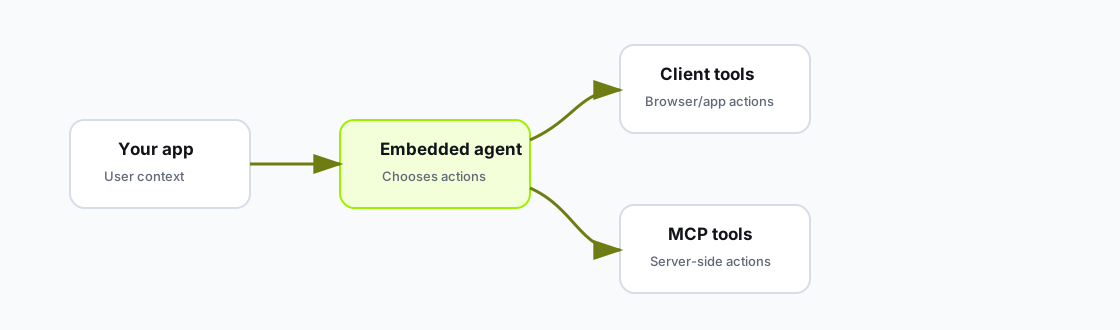
Embedded agents can combine app-local client tools with server-side MCP tools.
Use client tools for:
Use server MCP tools for:
<McpStackChat
  apiKey={apiKey}
  agentId={agentId}
  appSessionKey={session.id}
  userIdentity={userIdentity}
  appContext={{
    page: "ticket-detail",
    ticketId,
    selectedTab,
  }}
  clientTools={[
    {
      name: "draft_internal_note",
      description: "Draft an internal note in the current ticket editor without saving it.",
      inputSchema: {
        type: "object",
        required: ["body"],
        properties: {
          body: { type: "string" },
        },
      },
      execute: async ({ body }) => {
        setDraftNote(body);
        return { status: "drafted" };
      },
    },
  ]}
/>Client tools are app code. Treat them like privileged UI actions:
Use appContext for facts that help the agent understand the current screen.
Good context:
appContext={{
  page: "account-detail",
  accountId: "acct_123",
  visibleTicketIds: ["T-100", "T-101"],
  selectedTab: "activity",
}}
Avoid sending:
To let the agent "control the app," decide whether each action is local UI state or an authoritative backend operation. Use clientTools for local UI behavior and server MCP tools for backend reads and writes.