Global edge architecture
How MCP Stack routes MCP traffic through Azure Front Door, regional edge routers, and scale-to-zero hosted runtimes across production edge regions.
When you publish a hosted MCP server, MCP Stack deploys your runtime across a global edge stack built on Azure Front Door and Azure Container Apps, with a warm regional edge-routing layer in front of scale-to-zero runtimes.
This guide explains the architecture in enough detail that you can reason about latency, cold starts, health, and scaling.
MCP Stack uses two complementary edge layers:
| Layer | What it is | What it does for your MCP server |
|---|---|---|
| Global edge (Azure Front Door) | Microsoft's anycast network with edge locations worldwide | Terminates TLS, redirects HTTP to HTTPS, routes to healthy origins, and keeps a 150-second origin timeout budget for cold starts |
| Regional compute (Container Apps) | Five production Azure regions | Runs your generated MCP runtime and the regional edge router that routes traffic to it |
Front Door gets your traffic onto MCP Stack's network at the nearest healthy edge location. Regional compute is where tool calls actually execute. Both layers matter: Front Door reduces connection latency and centralizes TLS; regional edge routers and runtimes keep execution close to Azure regions where your server is deployed.
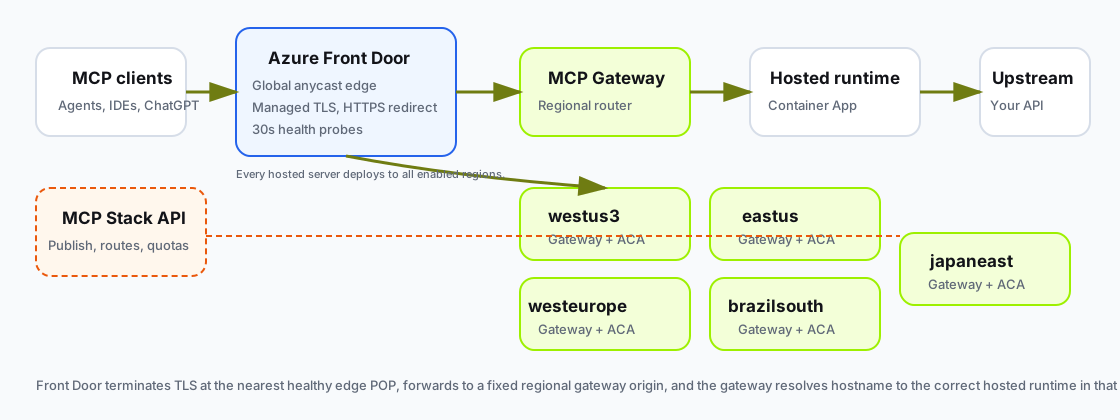
MCP clients enter through Azure Front Door, reach a fixed regional edge-router origin, and the edge router forwards to your hosted runtime in that region.
Every hosted MCP tool call follows the same data path in production:
MCP client
  -> Azure Front Door (nearest healthy edge POP)
  -> regional edge router (fixed platform origin)
  -> hosted MCP runtime Container App
  -> your upstream API
Important design choices in that path:
*.mcp.<domain>). Front Door forwards to a small set of regional edge-router origins. The edge router resolves hostname to the correct server.minReplicas = 1. Your hosted runtime defaults to minReplicas = 0 so idle servers do not consume compute./health for up to 90 seconds, then forwards your original MCP request exactly once. Non-idempotent tool calls are not retried by the edge router.If you use a custom MCP domain, customer traffic still follows the same path after TLS terminates at Front Door. The hostname changes; the routing model does not.
Hosted MCP servers deploy to every enabled production edge region. Region placement is platform infrastructure, not a per-server setting you pick in the dashboard.
| Region | Role |
|---|---|
westus3 | Regional edge router + shared Container Apps environment + runtime targets |
eastus | Regional edge router + shared Container Apps environment + runtime targets |
westeurope | Regional edge router + shared Container Apps environment + runtime targets |
brazilsouth | Regional edge router + shared Container Apps environment + runtime targets |
japaneast | Regional edge router + shared Container Apps environment + runtime targets |
When MCP Stack adds a production region, the rollout is platform-managed. New publishes automatically materialize runtime targets in the new region; you do not republish per server.
Each hosted server becomes one Container App per enabled region. Within a region, Azure Container Apps handles replica scaling.
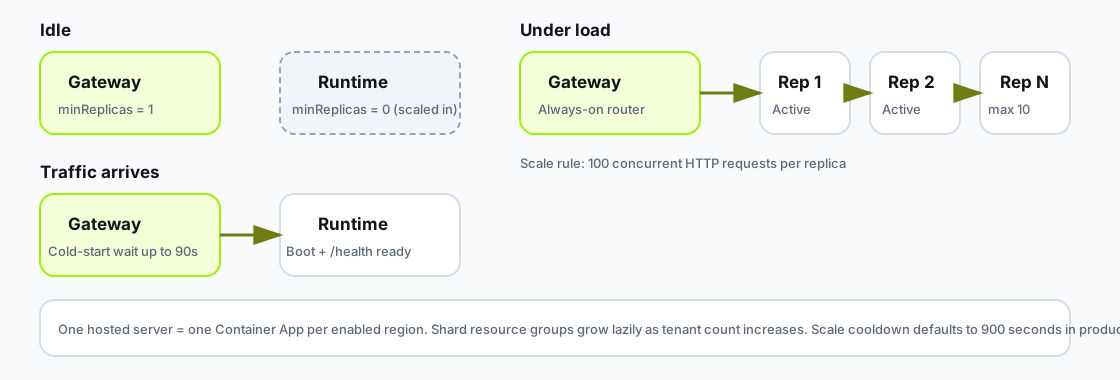
Edge routers stay warm while runtimes scale from zero to ten replicas per region based on HTTP concurrency.
| Setting | Default | Notes |
|---|---|---|
| CPU / memory | 0.50 vCPU, 1.0 GiB | Fixed small preset for self-serve plans |
minReplicas | 0 | Scale-to-zero when idle |
maxReplicas | 10 | Per region |
| HTTP scale rule | 100 concurrent requests / replica | HTTP concurrent-request scaling |
| Scale cooldown | 900 seconds | Production default |
Under sustained load, MCP Stack adds replicas until the concurrency rule is satisfied or the region hits maxReplicas. When traffic drops, replicas scale in after the cooldown window.
Regional edge routers use a smaller footprint (0.25 vCPU, 0.5 GiB) with minReplicas = 1 and maxReplicas = 2. Edge routers are routing and policy-enforcement layers, not tool executors. Keeping them warm avoids adding edge-router cold starts on top of runtime cold starts.
Hosted runtimes run in shared regional environments, and MCP Stack expands platform capacity automatically as the number of hosted servers grows. This is platform infrastructure: you do not manage capacity, placement, or regions, and your server keeps a stable assignment for its lifetime.
MCP Stack uses layered health signals rather than a single boolean "up" flag.
Front Door origin groups probe backend health every 30 seconds over HTTPS. Production edge-router origins use /health. Load balancing requires 3 of 4 successful samples before an origin is considered healthy.
Front Door also applies a profile-wide 150-second origin response timeout. That timeout is intentional: it gives the edge router enough time to wait for a scale-from-zero runtime without Front Door cutting the client connection early.
Hosted runtimes and edge routers expose /health with startup, readiness, and liveness probes. Generated runtimes emit a structured boot-ready log event at startup so cold-start duration is measurable in publish logs.
When multiple requests hit a scaled-in runtime, the edge router coalesces readiness waits per deployment target inside each edge-router instance and caches success briefly (default 60 seconds). That prevents a thundering herd of cold-start probes for the same server.
On the server Hosting tab, Global edge health summarizes regional target status: how many regions are healthy versus deployed. Use that view after publish, spec changes, or upstream outages.
For deeper operational signals, see Monitor usage and operations.
Use smoke checks after publish or configuration changes:
# Confirm tools/list succeeds against the hosted MCP URL
mcpstack smoke tools-list support-api --json

# Inspect server health and publish state
mcpstack servers get support-api --json
mcpstack servers checks support-api --json
Example smoke output shape:
Smoke test: tools/list
Server: support-api
Transport: streamable-http
Status: passed
Tools discovered: 14
If smoke passes but agents fail, compare Gateway logs and runtime logs for the same timestamp before assuming an edge outage.
MCP Stack provides global routing and multi-region deployment so you can ship MCP servers without operating your own edge stack. Be precise about what that means:
You get
You should plan for
MCP Stack does not publish a numeric uptime SLA in this documentation. Treat smoke checks, regional health, and logs as your operational source of truth.
Host runs your generated MCP runtime. Gateway (optional) adds OAuth and public client discovery. The global edge stack sits under Host:
OpenAPI -> generated MCP runtime -> Host publish -> global edge route -> MCP clients/agentsFor the full product layering diagram, see MCP Stack product model. For publish workflow steps, start with Create a hosted server.
| Question | Answer |
|---|---|
| Where does TLS terminate? | Azure Front Door |
| How many production regions? | Five: westus3, eastus, westeurope, brazilsouth, japaneast |
| Can I pick one region? | No. Hosted servers deploy to all enabled regions. |
| Default runtime scaling | 0–10 replicas per region, 100 concurrent requests per replica |
| Cold-start wait budget | Up to 90 seconds at the edge router; 150 seconds Front Door origin timeout |
| Where to check health | Dashboard Hosting tab, mcpstack smoke tools-list, publish logs |