Create your MCP server
Import an OpenAPI spec, select the tool surface, choose runtime auth, and create a generated MCP server in MCP Stack.
The main MCP Stack creation path is Generate from OpenAPI. It turns an OpenAPI specification into a hosted MCP runtime and saves the server configuration to your organization.
Use the dashboard wizard when you want the server to be managed by MCP Stack, attached to Gateway, published through Host, and used by an agent. Use the CLI for the same hosted lifecycle from a terminal.
Have these ready:
An MCP server is a tool surface for agents. Select the endpoints that are useful, safe, and explainable. A smaller server with strong tool descriptions usually performs better than a giant server with hundreds of ambiguous tools.
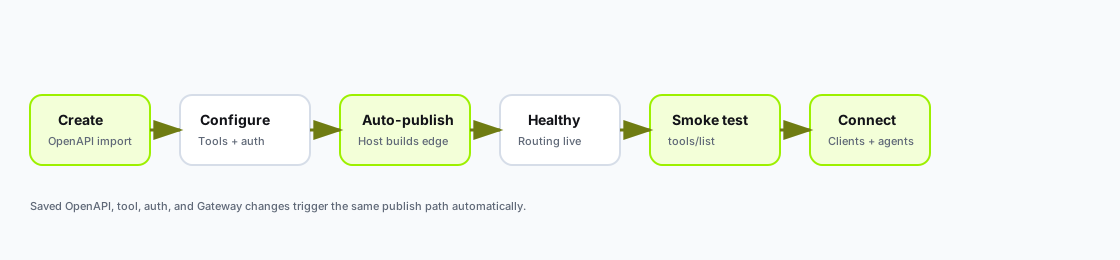
After you create or save a generated OpenAPI server, Host publishes automatically. Verify with tools/list before connecting clients or agents.
| Stage | Meaning |
|---|---|
| Create | Import OpenAPI, select tools, choose runtime auth, and save the server record. |
| Auto-publish | Host builds and deploys the generated runtime to the edge. |
| Healthy | Routing is live and the hosted MCP URL responds. |
| Smoke test | tools/list passes from the dashboard or CLI. |
| Connect | Copy the MCP URL from Connect, attach Gateway if needed, or add a custom domain. |
Saved changes to OpenAPI, enabled tools, runtime auth, environment variables, or Gateway configuration trigger the same publish path automatically.
This is the best path if you plan to publish through Host, attach Gateway, or use MCP Stack agents.
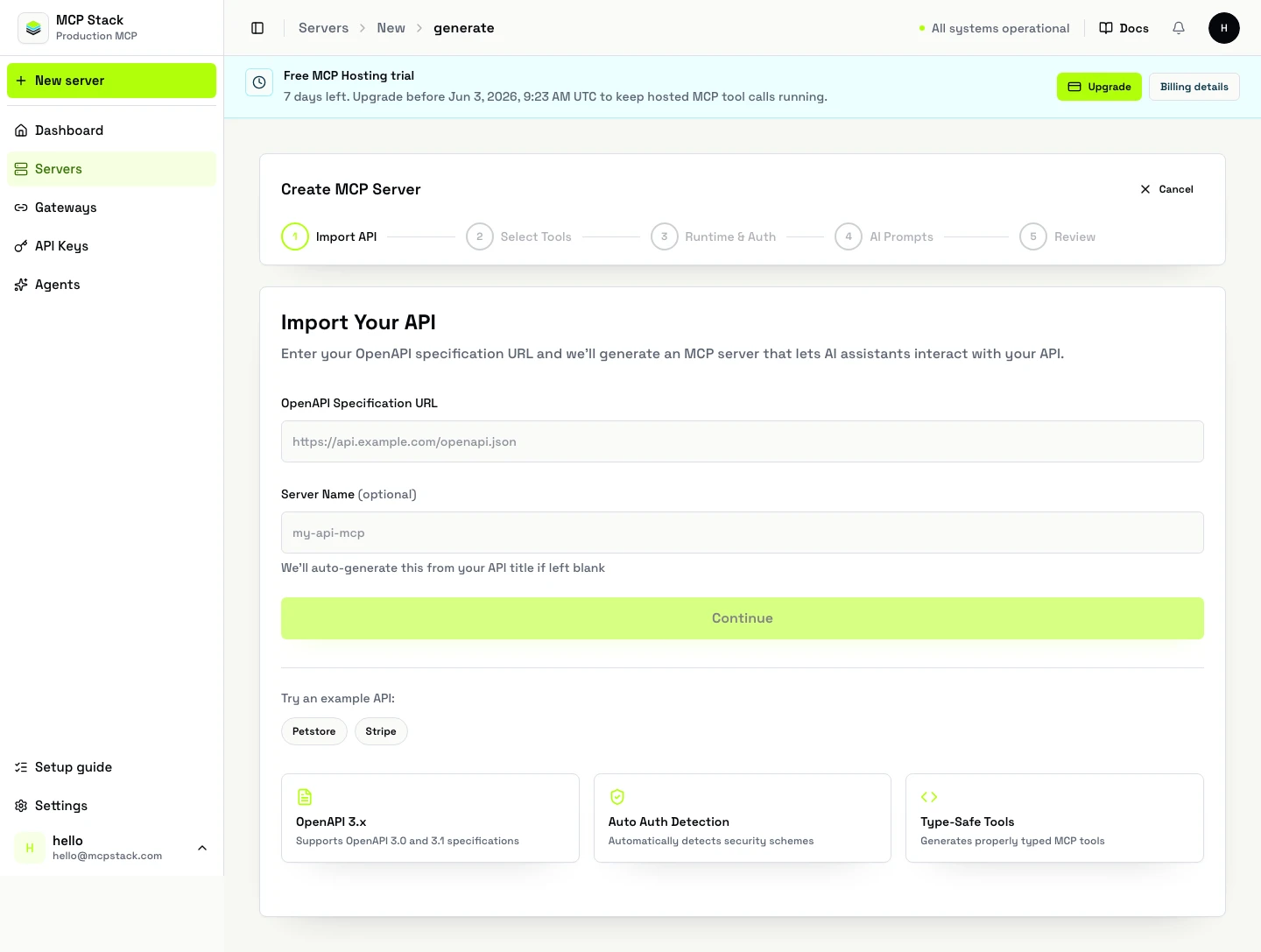
The dashboard wizard starts by importing a public OpenAPI URL. From there, MCP Stack parses endpoints, security schemes, and server metadata before you choose tools and auth.
MCP Servers.Create Server.Generate from OpenAPI.On the Import API step:
Continue.Good to know:
After MCP Stack analyzes the spec, it moves to Select Tools.
Use this step to decide what the agent should actually have access to:
The endpoint editor lets you add:
This is where you should trim noisy internal endpoints and make important tools easier for the model to use correctly.
Good tool instructions answer practical questions:
In the Authentication step, choose how the generated runtime should reach the upstream API:
Public API: no credentials are injected.Static Headers: inject fixed headers like X-API-Key, X-Tenant-Id, or Authorization.Use MCP Stack Gateway: Gateway becomes the OAuth edge in front of the server.If your OpenAPI spec declares security schemes, MCP Stack shows an auto-detection notice and recommends a mode. OAuth, OIDC, and HTTP bearer schemes should usually use Gateway because they represent user-scoped or bearer-protected access.
If the server uses user-scoped data, choose Gateway. The wizard can attach an existing reusable Gateway profile or create one inline from the OAuth inputs.
In AI Prompts, you can optionally add reusable context for the model.
Built-in templates include:
Domain ContextResponse FormatError HandlingThese are optional, but they are useful if you want the agent to speak in your product's language or follow a specific response style.
Use prompts for stable product context. Use tool instructions for endpoint-specific behavior.
On Review:
Create MCP Server.When you create it in the dashboard, MCP Stack:
From the detail page you can:
tools/list smoke testsAdd OpenAPI Spec or Update OpenAPI SpecUse the CLI when you prefer creating and publishing from a terminal, wiring MCP Stack into CI, or inspecting a server after creation.
Install:
npm install -g @mcpstack/cli
mcpstack auth login
Create from a public OpenAPI URL:
mcpstack servers create \
  --name support-api \
  --slug support-api \
  --runtime-type hosted \
  --openapi-url https://api.example.com/openapi.json \
  --json
Create from a local OpenAPI file:
mcpstack servers create --openapi-file ./openapi.yaml --jsonReplace the source spec later from the same local file path:
mcpstack servers update <server-id> --openapi-file ./openapi.yaml --jsonInspect and verify after publish:
mcpstack servers get support-api --json
mcpstack tools list support-api --json
mcpstack servers auth-config get support-api --json
mcpstack logs stream support-api
mcpstack smoke tools-list support-api --json
Watch a long-running publish:
mcpstack operations list support-api --json
mcpstack operations get support-api <operation-id> --jsonUse the REST API when you want to create hosted servers from your own admin workflow or provisioning system.
Create the server:
POST /api/v1/organizations/{orgId}/mcp-servers
Authorization: Bearer {token}
Content-Type: application/json

{
  "name": "Support API",
  "slug": "support-api",
  "runtimeType": "hosted",
  "openApiSpecUrl": "https://api.example.com/openapi.json"
}
Update configuration after creation:
PATCH /api/v1/organizations/{orgId}/mcp-servers/{serverId}
Authorization: Bearer {token}
Content-Type: application/json

{
  "name": "Support API"
}
Replace a private OpenAPI spec without putting it on the public internet:
PATCH /api/v1/organizations/{orgId}/mcp-servers/{serverId}
Authorization: Bearer {token}
Content-Type: application/json

{
  "openApiSpecJson": "{ \"openapi\": \"3.1.0\", \"info\": { \"title\": \"Support API\", \"version\": \"1.0.0\" }, \"paths\": {} }",
  "openApiSpecSource": "upload",
  "openApiSpecFileName": "openapi.yaml"
}
Run hosted checks and smoke tests:
POST /api/v1/organizations/{orgId}/mcp-servers/{serverId}/hosting-checks
POST /api/v1/organizations/{orgId}/mcp-servers/{serverId}/mcp-smoke/tools-list
Read publish logs and deployment state:
GET /api/v1/organizations/{orgId}/mcp-servers/{serverId}/deployment
GET /api/v1/organizations/{orgId}/mcp-servers/{serverId}/logs?page=1&pageSize=50
GET /api/v1/organizations/{orgId}/mcp-servers/{serverId}/deployment-operations
The API response includes the server record. Hosted publishing starts automatically for generated OpenAPI servers the same way it does from the dashboard and CLI.
| Symptom | What to check |
|---|---|
| OpenAPI import fails | If using a URL, confirm it is reachable by MCP Stack and returns OpenAPI 3.0/3.1 JSON or YAML. If using a local file or pasted spec, confirm the content parses as OpenAPI JSON/YAML. |
| No tools appear after import | Verify the spec defines operations with paths and methods; check for empty tags or filtered operations. |
| Auth mode looks wrong | Review securitySchemes in the spec; OAuth/OIDC/bearer usually needs Gateway, not Static Headers. |
| Publish stays unhealthy | Open Hosting logs, confirm upstream API base URL, and run mcpstack smoke tools-list. |
tools/list passes but tool calls fail | Check runtime auth mode, Gateway grants, and upstream API credentials. |
After the hosted server is healthy, you can attach a customer-owned subdomain from the dashboard, CLI, or API.
See Set up a custom MCP domain for the full workflow, DNS records, status stages, CLI commands, API endpoints, and troubleshooting. Use a subdomain only, such as mcp.example.com. The canonical MCP Stack URL remains available, and the custom /mcp URL becomes preferred only after DNS, managed TLS, and routing are active.
For OAuth-protected APIs, generated servers should opt into MCP Stack Gateway:
Do not model user OAuth as a static Authorization header or bearer-token passthrough. Static headers are for fixed secrets. User OAuth belongs in Gateway.
mcpstack servers create \
  --name support-api \
--openapi-url https://api.example.com/openapi.jsonOnce the server exists:
Gateway if the server is OAuth-backed.Connect and copy the MCP URL or client config.tools/list smoke test.